How to play an M3U8 link
Copy the stream's link
It ends in
.m3u8, sometimes followed by?token=…. Keep the whole thing. How to find it.Paste and press Play
The player reads the playlist, lists the qualities it offers and starts at one that suits your connection.
Watch, or save it
Finished videos get a button to save them as one MP4. Live streams play, but can't be saved.
What an M3U8 player does
An .m3u8 link points to an HLS playlist: a short text file that lists the pieces of a video and, often, the same video at several qualities. Safari plays these natively. Chrome, Edge and Firefox don't: opening an .m3u8 link in them downloads a text file or shows nothing. An M3U8 player is a page with a small HLS engine (here, the open-source hls.js) that reads the playlist, fetches the pieces and feeds them to the browser's video player.
It's handy for checking a stream before you save it, testing your own HLS setup, or watching a stream link someone sent you.
When a stream won't play
- “Blocked” or a network error: the server doesn't allow other websites to read the stream (CORS). It plays only on its own site.
- HTTP 403 or 404: the link has expired, or needs the site's cookies. Copy a fresh link from the page.
- An encryption error: the stream is protected with DRM and only plays in the service's own player.
- An http:// link: browsers block http:// video on https:// pages. Try the same link with https://.
Want the video, not just a player?
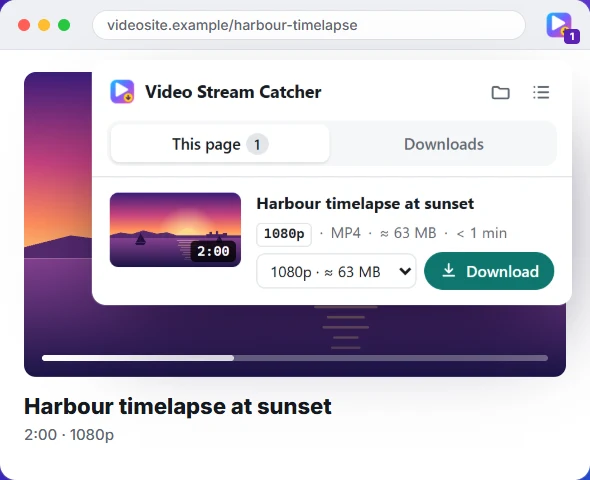
The Video Stream Catcher extension lists every video on the page you're watching, with its length, quality and size, and saves the one you pick as an MP4. It works where this page is blocked, because it runs on the video's own page.
Questions people ask
How do I play an M3U8 file online?
Paste the .m3u8 link into the box above and press Play. The player loads the stream with hls.js (Safari plays HLS on its own), picks a quality to suit your connection and starts playing.
Why won't my M3U8 link play here?
Usually because the video's server only lets its own website read the stream (a browser rule called CORS), or because the link has expired. Links copied from a page often carry a token that lasts a few minutes. Copy a fresh one, or watch it on the original page.
What is the difference between M3U and M3U8?
Both are playlist files. M3U8 is the same format written in UTF-8 text, and it's the one HLS streaming uses, with extra lines (#EXTINF, #EXT-X-…) describing each piece. A plain .m3u is usually a music playlist. More on M3U8 files.
How do I fix an M3U8 CORS error?
You can't fix it from the viewer's side: the video's server decides which websites may read its streams. If you run the server, add an Access-Control-Allow-Origin header to the playlist and its pieces. If you don't, play it on its own site, in VLC, or save it with the extension.
Can I play an .m3u8 file saved on my computer?
The file only lists links to the video's pieces. If those are full web addresses, open the file in a text editor and paste the address it came from instead. To play the pieces you already have, join them with the TS to MP4 converter and open the MP4.
Does it play live streams?
Yes. Live HLS streams play here like any other. They can't be saved as MP4, though, because they have no end.
Can I download the stream I'm playing?
If it isn't live or encrypted, yes: press “Download this stream as MP4” under the player, which opens the M3U8 to MP4 converter with the link filled in.
Which players open M3U8 on a desktop?
VLC (Media → Open Network Stream), mpv and recent versions of ffplay all play an .m3u8 link directly. Browsers other than Safari need a page with an HLS player, like this one.
Is anything uploaded or logged?
No. The stream goes from its server to your browser. This page doesn't record the links you play.
Skip the copying and pasting
The free Video Stream Catcher extension spots the video on the page you're watching, M3U8 or not. Click its icon, pick a quality and press Download: you get one MP4 file. It also works where this page can't, because it runs on the video's own page.
Free · No sign-up · No ads · Chrome, Edge and Firefox