
Skip to content
  1. Home
  2. Guides
  3. Download a blob video

How to download a blob video

Found a video whose address starts with blob:? That link only exists inside the page. Here's how to save the stream behind it instead.

Updated 23 November 2026

What a blob URL is

When you inspect a video and see something like blob:https://example.com/6f1c…, the player isn't playing a file from a server. It's playing data that the page's own code put together in memory. Almost always, that data comes from a stream: the page downloads short pieces of video (listed in an .m3u8 or .mpd playlist) and feeds them to the browser one after another.

That's why copying the blob: address gets you nowhere. Paste it in a new tab and nothing loads. Give it to a downloader and it fails. The address means something only to the page that created it, and only while that page is open.

So the trick is to ignore the blob and catch the stream that fills it.

Way 1: let an extension catch the stream

A browser extension sees the requests the page makes, including the playlist and pieces behind the blob. With Video Stream Catcher:

  1. Install the free extension.
  2. Open the page and play the video for a few seconds.
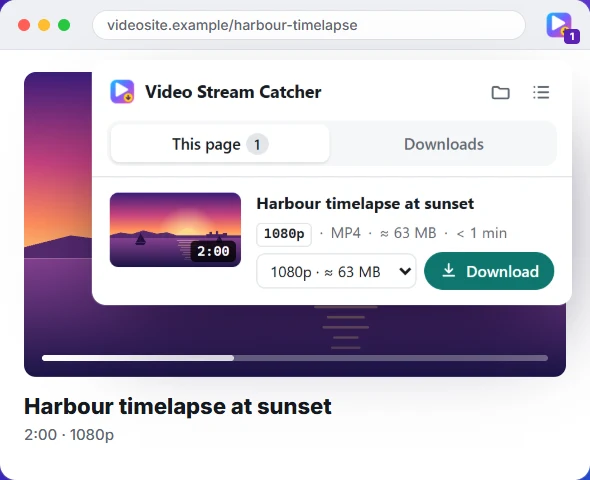
  3. Click the extension's icon. The stream behind the blob is listed with its length, quality and size.
  4. Press Download. You get one MP4, picture and sound included.

It also catches the trickier cases: numbered .ts pieces with no playlist, pieces disguised as .jpg or .png files, and sites that stream picture and sound as two separate files, which it merges.

Way 2: find the playlist yourself

  1. Open developer tools (F12, or Cmd+Option+I on a Mac) and choose the Network tab.
  2. Type m3u8 in the filter box, then play the video. If nothing appears, try mpd.
  3. Right-click the request and choose Copy → Copy URL. If there are several, the first is usually the master playlist with every quality.
  4. Paste it into the M3U8 to MP4 converter, or run ffmpeg -i "LINK" -c copy video.mp4.

The guide to finding the M3U8 link covers Chrome, Edge, Firefox and Safari, and what to do when the list stays empty. If the converter says the server blocked it, that site only lets its own pages read the stream. The extension, which works on the page itself, isn't affected.

When a blob video can't be saved

  • DRM: subscription services encrypt their streams and decode them inside the browser's protected player. No honest tool saves those.
  • Encrypted HLS: a playlist with an #EXT-X-KEY line is encrypted; Video Stream Catcher refuses it.
  • Live streams: no end, no file. Wait for the replay.

And as always: save only what you have the right to keep.
Questions people ask

What is a blob video URL?

An address starting with blob: that a page's code creates for data it holds in memory. Video players use it to play a stream they put together from pieces, so the address points to the page's memory, not to a file on a server.

How do I download a blob video without an M3U8?

Some sites stream numbered .ts pieces with no playlist, or send picture and sound as separate MP4 files. Video Stream Catcher handles both: it counts up the numbered pieces, or merges the picture and sound into one MP4.

Can VLC download blob videos?

No. VLC can't open a blob: address, for the same reason a new tab can't. Give VLC the .m3u8 behind the blob instead (Media → Open Network Stream).

How do I download a video from a blob link on Windows 11?

The same way as anywhere else: the operating system doesn't matter, the browser does. Use the extension in Chrome or Edge, or find the .m3u8 in the Network tab (F12) and convert it.

Why can't I open a blob: URL in a new tab?

A blob: address points to data held in the memory of the page that created it. It isn't on any server, so another tab, a download manager or an online tool has nothing to fetch. You have to save the stream the page is feeding into it.

Is a blob video a file I can right-click and save?

Usually not. “Save video as…” is greyed out or saves nothing, because the player builds the video piece by piece in memory from a stream (usually HLS or DASH).

Can every blob video be downloaded?

No. If the site uses DRM (Netflix, Disney+, Prime Video and other subscription services), the pieces are encrypted and only the site's player can decode them. Those can't be saved, by design.

What if I find an .mpd file instead of an .m3u8?

That's a DASH stream, the other common format behind blob videos. FFmpeg and yt-dlp can read .mpd links; Video Stream Catcher focuses on HLS, TS and MP4.

Skip the copying and pasting

The free Video Stream Catcher extension spots the video on the page you're watching, M3U8 or not. Click its icon, pick a quality and press Download: you get one MP4 file. It also works where this page can't, because it runs on the video's own page.

Free · No sign-up · No ads · Chrome, Edge and Firefox

The Video Stream Catcher popup listing a video with its quality, size and a Download button