Updated 23 November 2026
Most websites don't play a single video file. They stream video with HLS: the video is cut into hundreds of short pieces, and an .m3u8 playlist tells the player where each piece is. Save the .m3u8 and you get a small text file. Save one piece and you get a few seconds of video. To keep the whole thing, every piece has to be downloaded in order and joined into one file.
Which method suits you depends on whether you have the link already, and how comfortable you are with a terminal:
| Method | Best for | Needs |
|---|---|---|
| 1. Browser extension | Saving the video you're watching, without hunting for links | A one-click install |
| 2. Online converter | A link you already have, from a server that allows it | Nothing |
| 3. FFmpeg | Scripts, long videos, links that need extra headers | A command-line program |
Method 1: a browser extension (easiest)
An extension sees the requests the page makes, so it finds the playlist for you. With Video Stream Catcher:
- Install it from the Chrome Web Store (it works in Edge too; a Firefox version is in review).
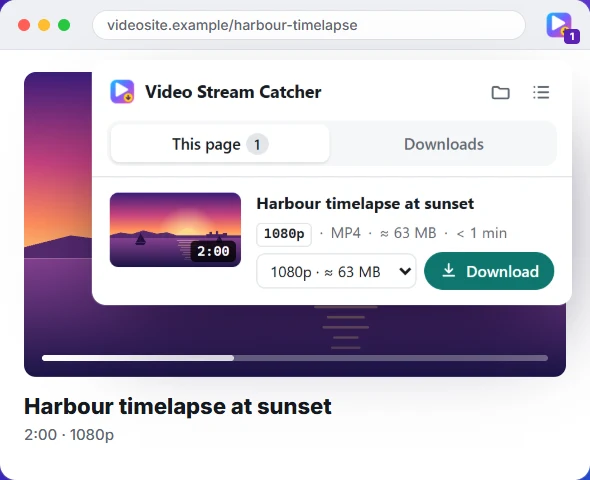
- Open the page with the video and press play. The icon shows how many videos it found.
- Click the icon. Each video is listed with a picture, its length, quality and estimated size.
- Pick the quality you want and press Download. The pieces are joined into one MP4 in your Downloads folder.
Because it works on the video's own page, it sends the same page address and cookies the site's player used. That's why it works on sites where a copied link fails elsewhere. It also handles numbered .ts pieces that have no playlist at all, and sites that stream picture and sound separately.
Method 2: an online M3U8 to MP4 converter
If you already have the link, paste it into the M3U8 to MP4 converter on this site. It lists the qualities in a master playlist, downloads the one you pick and saves one MP4. It runs in your browser, so nothing is uploaded.
The catch: a web page can only read a video from another site if that site allows it (a browser rule called CORS). Plenty of video servers allow it; many don't. When they don't, the converter says so, and the extension or FFmpeg is the way to go. Need the link first? See how to find a video's M3U8 link.
Method 3: FFmpeg (one command)
FFmpeg is a free command-line program that reads HLS directly. Install it (winget install Gyan.FFmpeg on Windows, brew install ffmpeg on a Mac, sudo apt install ffmpeg on Ubuntu), then run:
ffmpeg -i "https://example.com/video/index.m3u8" -c copy video.mp4-c copy joins the pieces without re-encoding, so it's fast and lossless. Keep the quotes: links often contain &, which the terminal would otherwise cut at. If the server answers 403, it usually wants the page's address:
ffmpeg -headers "Referer: https://example.com/watch/123" -i "https://example.com/video/index.m3u8" -c copy video.mp4The FFmpeg guide covers picking a quality, separate sound and the common error messages.
What about VLC?
VLC can save a stream too: Media → Convert / Save → Network, paste the link, choose the Video - H.264 + MP3 (MP4) profile and a file name. But VLC re-encodes everything, so it runs in real time or slower and the copy is a little worse than the original. It's fine in a pinch; the methods above are better.
If it doesn't work
- 403 or 401 errors: the link expired or needs the site's session. Reload the page and copy a fresh link, or use the extension.
- The MP4 has no sound: the stream sends sound as a separate playlist. In FFmpeg, give both:
ffmpeg -i video.m3u8 -i audio.m3u8 -map 0:v -map 1:a -c copy out.mp4. - “Encrypted” or an
#EXT-X-KEYline: the video is protected, and can't be saved. - It never finishes: it's a live stream. Wait for the replay.
Save only videos you have the right to keep: your own, course and webinar recordings you have access to, and openly licensed media.