How to convert M3U8 to MP4
Copy the .m3u8 link
Open your browser's developer tools (F12), go to the Network tab, type
m3u8in the filter and play the video. Right-click the request and copy its address. Step-by-step guide.Paste it and press Convert
If the link is a master playlist, you'll see every quality the stream offers, with its resolution and bit rate.
Pick a quality and save
The pieces download in parallel and are joined into one MP4, which goes straight to your Downloads folder.
What is an M3U8 file?
An M3U8 file is a playlist for an HLS stream, the format most websites use to play video. It's plain text: a list of links to short pieces of video, usually two to ten seconds each, saved as .ts or .m4s files. A master playlist lists the same video at several qualities, and the player switches between them as your connection speeds up or slows down.
That's why saving the .m3u8 itself gets you a tiny text file, not a video. To get something you can play anywhere, every piece of one quality has to be downloaded in order and joined into a single file. That's what this converter does, and it keeps the original video and sound as they are, without re-encoding them.
Master playlist or one quality?
If the link you paste is a master playlist (it contains #EXT-X-STREAM-INF lines), the converter lists every quality it offers, with resolution and bit rate, and you choose one. If it's a media playlist (lines of #EXTINF followed by pieces), it's already a single quality and the download starts straight away. When in doubt, copy the first .m3u8 the page requests: that's usually the master. How to find it.
Why some links won't convert here
- The server blocks other websites (CORS). Browsers only let a page read a video from another site when that site allows it. Many video servers allow it; many don't. The link still plays on its own site, but this page can't read it.
- The link has expired. Many sites add a token to their video links that stops working after a few minutes, or only with the site's cookies. Copy a fresh link and convert it straight away.
- The stream is encrypted or live. A playlist with an
#EXT-X-KEYline is encrypted, and a live stream has no end to save. Neither can be converted, and DRM-protected services are off limits by design.
This page, the extension or FFmpeg?
| This page | Extension | FFmpeg | |
|---|---|---|---|
| Finds the video for you | No, paste a link | Yes, on the page you're watching | No, paste a link |
| Servers that block other sites | Can't read them | Works | Works |
| Links that need the site's cookies | No | Yes | With extra options |
| Numbered .ts pieces with no playlist | No | Yes | No |
| Install | Nothing | One click | A command-line program |
Comfortable with a terminal? ffmpeg -i "LINK.m3u8" -c copy video.mp4 does the same job without re-encoding. The FFmpeg guide covers the options for links that answer 403 and fixes for common errors.
Questions people ask
How do I convert an M3U8 link to MP4?
Paste the link into the box above and press Convert to MP4. If it's a master playlist, pick a quality. The pieces download in parallel and are joined into one MP4 that goes to your Downloads folder.
Why does my M3U8 link give a 403 error?
The link has expired, or the server only answers requests that carry its own page's address or your login cookies. Copy a fresh link and convert it straight away. If it still fails, the extension downloads from the video's own page, with the headers the server expects.
Can VLC convert M3U8 to MP4?
Yes: Media → Convert / Save → Network, paste the link, choose the “Video - H.264 + MP3 (MP4)” profile and start. But VLC re-encodes, so it runs in real time or slower and loses a little quality. This page and FFmpeg's -c copy keep the original.
Can I convert a blob URL to MP4?
Not directly: a blob: address only exists inside the page that made it. Find the .m3u8 behind it in your browser's Network tab, or let the extension catch it. See how to download a blob video.
Is this M3U8 to MP4 converter free?
Yes. There's no sign-up, no watermark and no file-size fee. The conversion runs on your own computer, in this browser tab, so there's no server cost to pass on.
Is my video uploaded anywhere?
No. Your browser downloads the pieces straight from the video's server and joins them in this tab. Nothing passes through our servers, and the finished MP4 goes to your Downloads folder.
Does converting M3U8 to MP4 lose quality?
No. The pieces are re-wrapped into an MP4 container, not re-encoded, so the picture and sound are exactly what the stream sent. Pick the highest quality in the list to get the best file.
Why do I get a CORS or “blocked” message?
Most video servers only let their own website read their videos. A page like this one can't get around that rule, so the link fails here even though it plays on the original site. The Video Stream Catcher extension works on the video's own page, so it isn't blocked.
Why is my MP4 silent?
Some streams send the picture and the sound as two separate playlists. This page saves the picture playlist you chose; if the sound is separate, you'll see a warning before you save.
I have a .m3u8 file on my computer. Can I convert it?
An .m3u8 file only lists where the video's pieces are; the video itself isn't in it. If you saved it from a website, paste the web address it came from instead. If you've already downloaded the .ts pieces, drop them and the .m3u8 together into the TS to MP4 converter, which follows the playlist's order.
Can it convert encrypted, live or DRM streams?
No. Playlists with an #EXT-X-KEY line are encrypted, live streams have no end, and DRM services (Netflix, Disney+, Prime Video and the like) are protected on purpose. This tool refuses them, and so does the extension.
How long a video can I convert?
The MP4 is built in this tab before it's saved, so very long, high-quality videos need a lot of free memory. If a long video stops, pick a lower quality, or use FFmpeg, which writes straight to disk.
Skip the copying and pasting
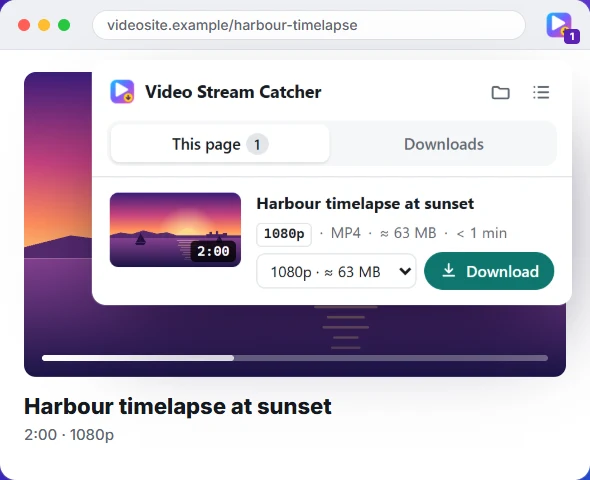
The free Video Stream Catcher extension spots the video on the page you're watching, M3U8 or not. Click its icon, pick a quality and press Download: you get one MP4 file. It also works where this page can't, because it runs on the video's own page.
Free · No sign-up · No ads · Chrome, Edge and Firefox