How to convert TS to MP4
Choose your .ts files
One file, or all the pieces of a video at once. Press Ctrl+A (Cmd+A on a Mac) in the file picker to select a whole folder.
Wait a few seconds
The pieces are put in order and re-wrapped as MP4. Nothing is re-encoded, so it's fast and lossless.
Save the MP4
The finished file goes to your Downloads folder and plays on phones, in editors and everywhere else.
Join many .ts pieces into one MP4
Streaming video arrives as short .ts pieces, often hundreds of them, each a few seconds long. Joined in the right order, they make the full video. Two things matter:
- The order. Computers sort names as text, which puts
seg10.tsbeforeseg2.ts. This converter sorts by the number instead, and if you add the .m3u8 playlist, it follows the playlist exactly. - The pieces themselves. Some sites disguise pieces as .png, .jpg or .html files. The converter finds the video data inside each one. A file that isn't video at all is skipped and named, so you know what's missing.
Why it takes seconds: remux, not re-encode
TS and MP4 are containers: boxes that hold the video and sound streams. In almost every streamed video, the streams inside are H.264 video and AAC sound, which both containers can hold. So converting doesn't mean compressing the video again; the streams are lifted out of one box and placed in the other. That's why it's fast, and why the MP4 looks exactly like the original.
The exceptions are H.265 (HEVC) video and AC-3 or E-AC-3 sound, which this converter can't put in an MP4 without re-encoding. You then get the pieces joined into one .ts file instead, which VLC plays.
TS vs MP4 at a glance
| TS | MP4 | |
|---|---|---|
| Made for | Broadcast and streaming | Storing and sharing files |
| Plays on phones and in editors | Often not | Almost everywhere |
| Picture quality | The same: usually identical H.264 video inside | |
| Can be joined end to end | Yes, by design | No, needs remuxing |
Merge TS files with FFmpeg
FFmpeg's concat option joins files listed in a text file without re-encoding. Make the list in number order, then join.
Windows (Command Prompt):
(for %f in (*.ts) do @echo file '%f') > list.txt
ffmpeg -f concat -safe 0 -i list.txt -c copy video.mp4
macOS / Linux:
for f in $(ls -v *.ts); do echo "file '$f'"; done > list.txt
ffmpeg -f concat -safe 0 -i list.txt -c copy video.mp4
ls -v sorts by number. Windows' for sorts as text, so check list.txt before running FFmpeg if your names have no leading zeros. FFmpeg stops with Invalid data found when processing input on disguised pieces; the converter above handles those.
TS is also designed to be joined end to end, so a plain binary copy works for most streams: copy /b seg0.ts+seg1.ts+seg2.ts all.ts on Windows, or cat $(ls -v *.ts) > all.ts on macOS and Linux. The result is still TS; turn it into MP4 with ffmpeg -i all.ts -c copy video.mp4 or the converter.
Get one MP4 next time
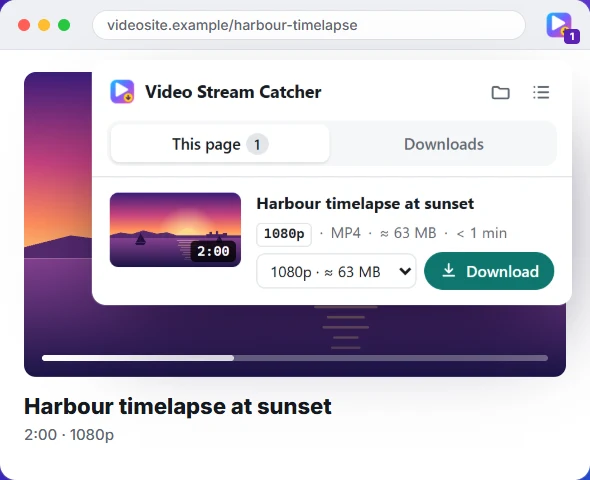
If you're saving .ts pieces from a website to join them afterwards, the Video Stream Catcher extension does both steps at once: it finds the stream on the page, downloads every piece and saves one MP4. It even handles numbered pieces that have no playlist. Have the playlist's link instead? Use the M3U8 to MP4 converter, or read what an M3U8 file is.
Questions people ask
Is TS better than MP4?
Neither is better for picture quality: both usually hold the same H.264 video and AAC sound. TS is built for broadcasting and streaming, where a lost packet mustn't break playback. MP4 is built for keeping and sharing files, and it plays on almost everything. For a file you want to keep, MP4 is the better choice.
Does converting TS to MP4 lose quality?
Not here. The video and sound are moved from the TS container to an MP4 container as they are, without re-encoding, so nothing is lost and it takes seconds rather than minutes.
How do I merge TS files into one MP4?
Select all the pieces at once in the box above. They're sorted by the numbers in their names, so seg2 comes before seg10, then joined into one MP4. If you have the .m3u8 playlist they came with, add it too: its order is then used. Prefer the command line? See merging with FFmpeg.
How do I convert TS to MP4 with VLC?
In VLC, choose Media → Convert / Save, add the .ts file, press Convert / Save, pick the “Video - H.264 + MP3 (MP4)” profile and a file name, then Start. VLC re-encodes the video, so it's slower than this page and the copy is slightly worse.
Is a TS file safe to open?
A .ts video file is just video data, and opening it in a media player is safe. Be wary of a “.ts” file that came from somewhere unexpected: the same extension is used for TypeScript code, and a file can be named anything. This converter only reads video data and skips anything else.
Is my file uploaded?
No. The conversion runs in this browser tab, on your computer. Once the page has loaded, it even works offline.
Why did I get a .ts file back instead of an MP4?
The video uses a format that can't go into an MP4 without re-encoding, such as H.265 (HEVC) video or AC-3 sound. The pieces are still joined into one .ts file, which VLC and most players open.
My pieces end in .png, .jpg or .html. Can I convert them?
Often, yes. Some sites disguise video pieces as images or web pages. The converter looks for the video data inside each file and skips the fake header. Files that really aren't video are skipped and named.
Get the video without collecting the pieces
The free Video Stream Catcher extension spots the video on the page you're watching, M3U8 or not. Click its icon, pick a quality and press Download: you get one MP4 file. It also works where this page can't, because it runs on the video's own page.
Free · No sign-up · No ads · Chrome, Edge and Firefox